
It’s not uncommon to hear leaders, deans, registrars, and IT directors in many universities around the world talk about “managing student data,” “digital operations,” and “student engagement.” Yet many still treat both systems as one. That is why the phrase “LMS vs CRM for universities” remains important in 2026. Universities still confuse these systems. Both store student data. Both support various digital operations. That overlap, combined with the fact that teams often mix admissions-facing and academics-facing needs in a single tool, creates real confusion. Decision-makers are often unclear about which system is responsible for what.
This confusion matters deeply because using the wrong tool (or trying to stretch one tool beyond its natural scope) can lead to inefficiencies, frustration, and a poor experience, for staff and students alike.
Why Universities Confuse LMS and CRM

At first glance, both an LMS and a CRM may seem like just “digital student systems.” They store student data. They support manual operations. And they can both be accessed online. Because of these surface similarities, many institutions lump them together, hoping to cover admissions, academics and student services with a single platform.
There are a few reasons why this confusion becomes particularly common:
- Overlapping data storage: Both systems keep information about students. A CRM records prospective-student contact info, application status, and communication history. An LMS stores enrolled-student profiles, coursework, grades, and completion status. To someone in admissions or administration, both sets of data may look like “student data.”
- Digital operations in both domains: Universities today expect digital tools in both admissions and academics, for capturing online applications, delivering video lectures, managing assignments, and sending automated emails.
- Teams mixing admissions and academic processes: In some institutions, the same administrative teams oversee both application management and academic scheduling. Without clear role definitions, they may attempt to merge workflows in one tool, further blurring the line.
- Lack of clarity among decision-makers: Often, leadership may mandate a single “student management system,” without specifying the distinct needs of admissions vs learning. As a result, vendors or internal IT pick a system and try to make it serve all functions, whether or not it was designed for them.
So, when you ask “Which platform handles what?” as in LMS vs CRM for universities, the answer is: they have very different core purposes. Let’s look at them more closely.
What an LMS Controls in a University

A Learning Management System (LMS) is the digital backbone of academic delivery and learning management. It is not about recruiting or admissions. Rather, it focuses on enabling, delivering, and tracking learning.
Here are the main responsibilities and features of a university LMS:
- Course delivery and lesson scheduling: An LMS helps schedule courses (online, hybrid or blended), organise sections, manage enrollment into courses, and ensure students know when and how to access lecture materials.
- Hosting video lectures and recorded content: If a course uses pre-recorded lectures, a frequent pattern in online or hybrid learning, the LMS stores and serves the videos. It makes accessing lecture videos easy for students, anytime and anywhere.
- Assignments, quizzes, and grading systems: An LMS enables instructors to upload assignments, design quizzes or assessments, accept submissions, and grade students. It manages deadlines, grading rubrics, feedback and ensures consistent academic workflow.
- Tracking student progress and completion reporting: A strong LMS provides analytics on student participation, who watched lectures, who submitted assignments, and who participated in discussions. This progress tracking helps instructors monitor engagement, identify students who may be falling behind, and intervene when necessary.
- Faculty uploads and academic content control: Instructors or course authors can manage their own content, reading materials, lecture notes, slide decks, and multimedia resources. The LMS allows version control, updates, and ensures that course materials are centrally accessible.
Beyond these core features, modern LMSs support many additional capabilities. The data logged by LMS systems, about submissions, content accessed, and interactions, can be used for deeper analytics. For example, a 2022 study showed that LMS usage logs (number of assignment submissions, content completed) could predict final student performance with high accuracy. That means an LMS isn’t just a delivery tool; it can offer insights into at-risk students, support targeted interventions, and contribute to student success strategies.
What a CRM Controls in Student Operations

While the LMS handles academic delivery, a Customer Relationship Management (CRM) system in a university context is responsible for managing relationships with prospective students, applicants, enrolled students, alumni, and other stakeholders. The core aim is to manage the full lifecycle of a student (or any constituent), from first contact to graduation and beyond.
Here are the main functions of a CRM in the higher-ed context:
- Lead capture from ads and websites: A CRM captures inquiries and prospective-student information submitted via websites, social media campaigns, paid ads, inquiry forms, and open-day registrations. This ensures that every potential lead is recorded centrally.
- Application tracking from inquiry to enrollment: As applicants move through different stages, inquiry, application submission, document verification, acceptance, and enrollment, CRM tracks their status. It provides admissions teams with visibility into where every candidate stands.
- Automated follow-ups (email, SMS, WhatsApp, etc.): CRMs automate communications. Once a prospective student expresses interest, the system can schedule follow-up emails, send reminders about application deadlines, ask for missing documents, or share relevant information. This improves efficiency and responsiveness.
- Counsellor assignment and performance tracking: In many institutions, counsellors or admissions officers handle prospective students. A CRM allows leads to be routed (e.g., round-robin) to specific counsellors. It also tracks counsellor performance, response times, and conversion rates from inquiry to enrollment.
- Storing student communication history and interaction logs: Every email, call, chat, or meeting can be logged under a student’s profile. That gives admissions and support teams a 360-degree view of interactions. It helps ensure personalised communication and reduces redundancy or conflicting outreach.
In essence, a CRM is the tool for “student operations”, everything outside of academics: recruitment, admissions, communications, support, retention, and alumni relations.
When Universities Need Both Systems
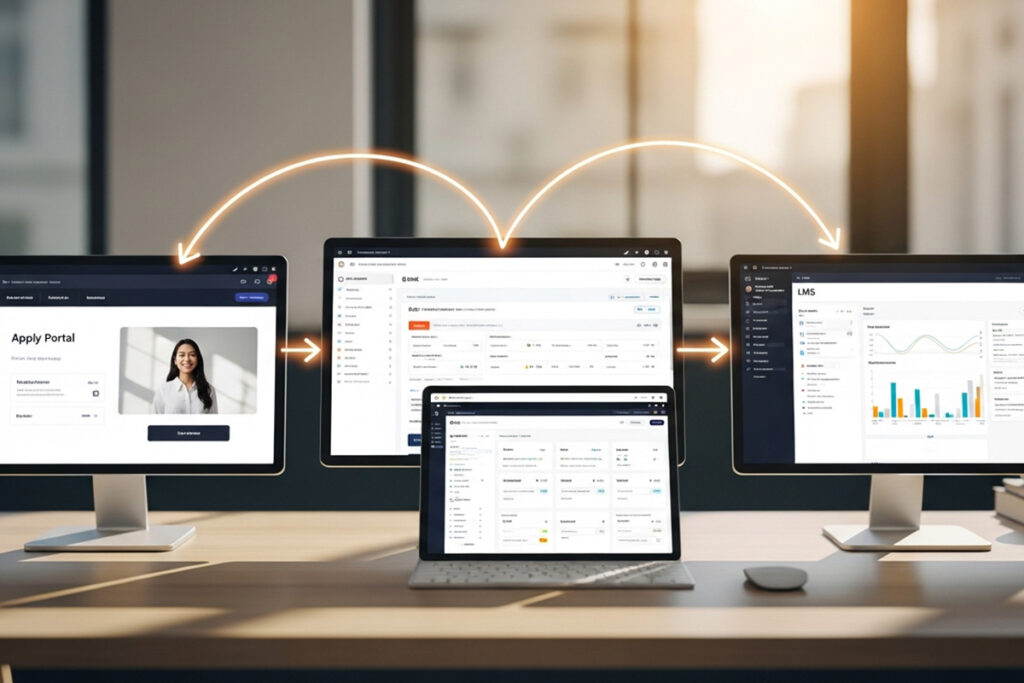
Because LMS and CRM serve different purposes, a modern university needs both, working together as one connected ecosystem.
- CRM manages everything before admission: From first inquiry to application, the CRM captures leads, tracks engagement, sends automated follow-ups, and nurtures prospects.
- LMS manages everything after enrollment: Once a student is admitted, the LMS becomes their academic hub for courses, lectures, assignments, and assessments.
- CRM hands approved students to the LMS: After an applicant is accepted, their profile automatically flows into the LMS for course access, scheduling, and onboarding.
- LMS sends performance data back to the CRM: Engagement, progress, and completion data feed into CRM dashboards, giving teams a full picture of student performance and retention.
Together, they enable a seamless student lifecycle: Integrated properly, both systems eliminate silos, reduce manual work, and give institutions a clear “interest-to-graduation” view powered by reliable data.
How Vigilearn Connects LMS and Apply Portal
At Vigilearn, we understand that a university’s digital architecture must reflect the full student lifecycle. That means bridging admissions (leads, applications) with academics (courses, content, assessments), and ensuring smooth data flow across both. Our approach connects three critical components: the application portal, the CRM, and the LMS.
Here’s how it works in practice:
- Apply Portal captures verified applications: When a prospective student visits your website and fills out an application form, our Apply Portal records that information. It ensures that data, name, contact info, academic interests, and submitted documents are captured and verified.
- CRM runs counselling, communication, and document processing: Once leads are in the Apply Portal, the CRM takes over. Admissions officers or counsellors get assigned prospective students, automated workflows send follow-up messages (via email or even messaging platforms like WhatsApp), reminders for document submission, and status updates. This ensures efficient communication and reduces manual effort.
- Approved students move into LMS automatically: As soon as a student is accepted and enrollment confirmed, our system automatically creates their profile in the LMS. No manual enrolment, no messy CSV uploads. The student gets timely access to course materials. Academic teams can immediately assign them courses, modules, or batches.
- Academic teams gain direct access to enrolled users: Faculty and academic administrators work directly in the LMS, designing courses, uploading lectures, scheduling assignments, and setting quizzes. They see only enrolled students, avoiding confusion with prospective applicants who are still in the CRM pipeline.
- Central reporting links learning with admissions data: On the reporting side, data from LMS (engagement, progress, completion) and from CRM (admissions source, conversion rates, counsellor performance, communication history) are merged. Leadership gains a 360-degree view, seeing how many leads converted into enrolments, which programmes draw more committed students, which ones complete courses successfully, and where drop-offs happen.
This unified architecture avoids fragmentation, reduces administrative burden, and ensures that the student journey, from first interest to final graduation, is smooth, traceable, and data-driven.
Indeed, when systems operate in silos, universities often face duplication of effort, missing data, inconsistent student experiences, and poor analytics. But when integrated, as Vigilearn envisages, institutions can operate as one coherent digital ecosystem with better outcomes for staff and students.
