


Choosing an LMS Is More Than Comparing Features
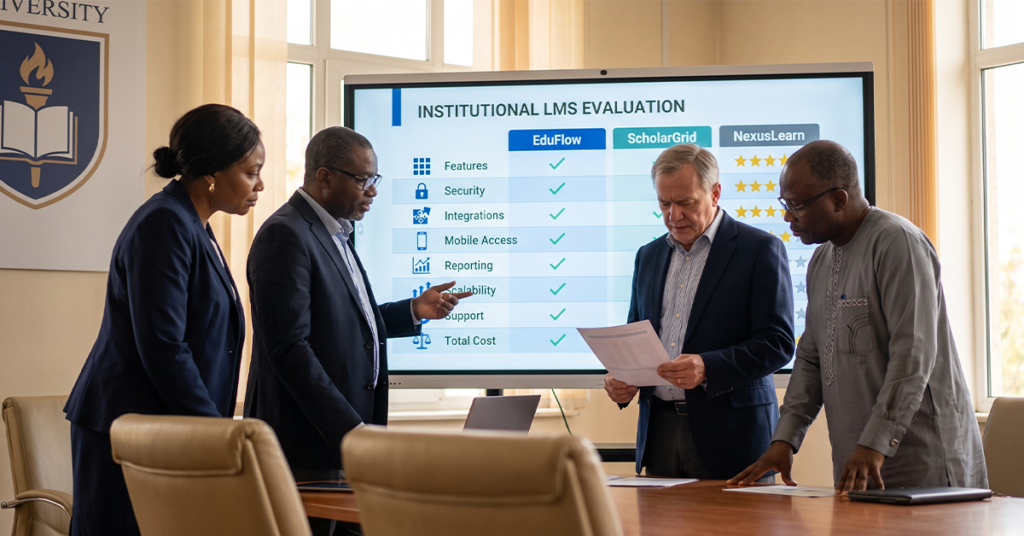
Choosing the right LMS is a question institutions tend to ask too late, usually after a demo has already impressed a committee. By then, the conversation has quietly narrowed to features: does it have a gradebook, can it host video, does the calendar look nice. Those things matter, but they are not where a sound decision starts. A platform that looks polished in a sales demo can still be the wrong fit if nobody worked out what the institution actually needs it to do first.
Schools, universities, businesses and training providers are not evaluating the same thing, even if their shortlist looks identical. A university juggling faculty autonomy, accreditation reporting and thousands of concurrent users has different pressure points to a training academy running short, structured courses for a few hundred learners. This article sets out a practical evaluation framework, built around institutional requirements first and vendor features second, so that by the end you have a clear, defensible way to compare LMS platforms rather than a gut feeling about which demo went best.
Read More: AI-Powered LMS: What It Actually Means for Universities in 2026
Define What Your Institution Needs Before Comparing LMS Platforms
Before contacting a single vendor, it pays to document your LMS requirements in detail. Skipping this step is the most common reason institutions end up locked into an LMS that never quite fits.
- Number of learners and instructors, now and over the next three to five years.
- Learning formats, whether that is fully online, blended, cohort-based or self-paced.
- Course types, from short certifications to multi-year degree programmes.
- Assessment requirements, including exam proctoring, plagiarism checks and rubric-based grading.
- Reporting requirements, for accreditation bodies, government regulators or internal boards.
- Existing technology, including your student information system and identity provider.
- Integration needs with admissions, examinations and finance systems.
- Future growth, such as new campuses, new programmes or new learner segments.
Writing these down before you speak to a vendor changes the conversation. Instead of asking “what can your platform do,” you are asking “can your platform do this, specifically,” a far harder question for a sales team to dodge.
LMS Evaluation Checklist: Essential Features

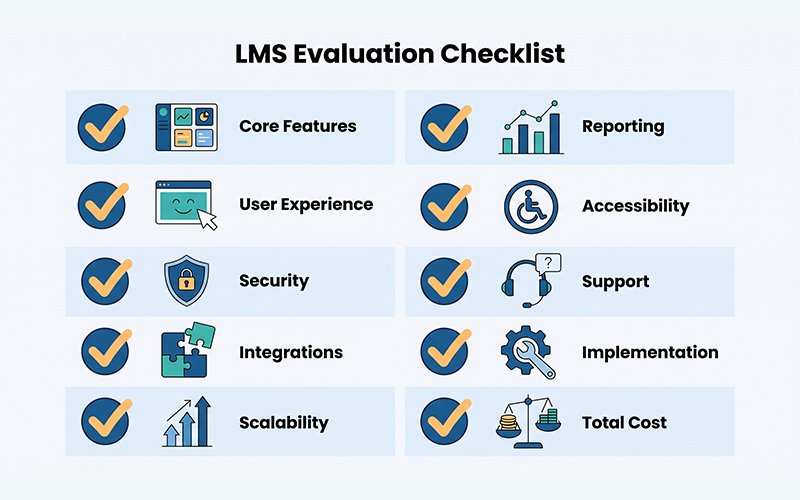
Once requirements are documented, build an LMS evaluation checklist that separates must-have features from optional ones, so you can judge which is genuinely the best LMS for your institution rather than the one with the longest feature list.
Must-have features typically include:
- Course and content management
- Assignments and assessments, with rubric support
- Student progress tracking
- User management and role-based permissions
- Communication tools, including announcements and messaging
- Reporting and analytics
- Mobile accessibility
Frequently optional, but worth evaluating deliberately, are:
- Structured learning paths and prerequisites
- Certificate generation
- Virtual classroom or live session tools
- Gamification elements
Treating this as a genuine checklist, rather than a wish list, keeps the LMS selection criteria grounded in what your institution will actually use day to day.
LMS Selection Criteria: Security and Data Protection
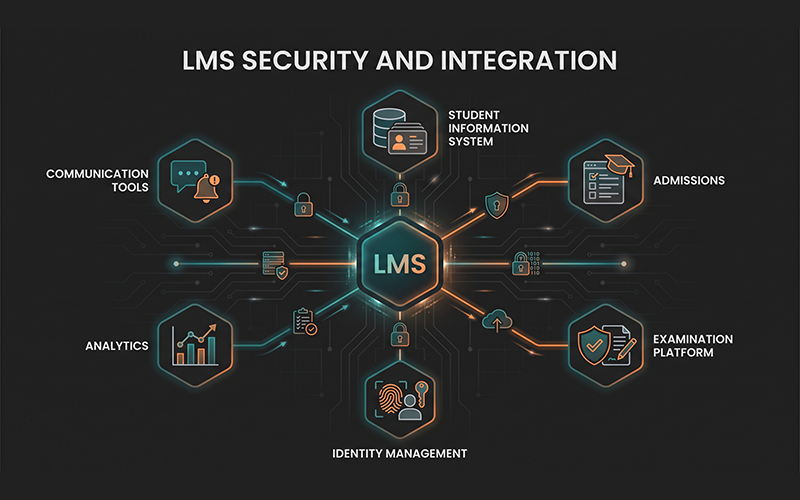
An LMS holds sensitive learner data: names, grades, attendance, sometimes financial and disciplinary records. Security should never be assessed on the strength of a vendor’s marketing page. Ask specific, verifiable questions instead:
- How is data encrypted, both at rest and in transit?
- What access controls and role-based permissions exist?
- How are user accounts authenticated, and is multi-factor authentication supported?
- How frequently are data backups taken, and where are they stored?
- What audit records are kept, and can institutions access them?
- Who owns the institutional data, and what happens to it if the contract ends?
The 2024 EDUCAUSE Horizon Report on cybersecurity and privacy makes the point plainly: cybersecurity has to be treated as a core institutional competency, not an afterthought bolted onto procurement. Vendors who cannot answer these questions clearly and quickly are telling you something important about how seriously they take data protection.
Read More: Student Onboarding: How Universities Build a Seamless First 90 Days
Integration and Interoperability
Very few institutions buy an LMS in isolation. It has to work alongside a student information system, an admissions platform, an examination tool and, increasingly, analytics and communication systems. This is where many LMS evaluations quietly fail: a platform that looks excellent alone creates duplicate data entry and disconnected reporting once actually deployed.
1EdTech, the standards body formerly known as IMS Global, maintains open specifications built for this problem. OneRoster allows secure, automated sharing of class rosters and enrolment data between a student information system and an LMS, removing the need for manual re-entry at the start of every term. LTI, now in its 1.3 version, lets a learner move from the LMS into a third-party tool, an assessment platform or a virtual lab, without logging in again, while securely passing the relevant course context. Asking whether a vendor supports these standards, and to what depth of certification, is one of the sharpest LMS RFP questions you can raise, since a vague “yes, we integrate with most systems” often means proprietary, one-off connectors that are costly to build and painful to maintain.
This is precisely the thinking behind Vigilearn’s approach: rather than treating the LMS as a standalone purchase, Ediify LMS is built to work within a connected ecosystem alongside admissions, student records and examinations, so data recorded once does not need re-entering elsewhere.
User Experience and Accessibility
A technically capable LMS that nobody enjoys using will underperform regardless of its feature list. Evaluate the experience separately for each group who will actually use the platform.
Students need intuitive navigation, dependable mobile access and content that loads quickly on ordinary connections. Faculty need to build a course without depending on IT support for every step, and to bring in external tools without friction. Administrators need self-service reporting and a manageable support workload, rather than a stream of basic tickets a better-designed interface would have prevented.
Accessibility deserves specific attention rather than a passing mention. Ask whether the platform meets recognised standards such as WCAG 2.1, and ask for evidence rather than a checkbox on a features page. Quality Matters publishes widely used rubrics for evaluating online course design, including accessibility, and referencing that standard during vendor conversations signals that your institution takes this seriously rather than treating it as a compliance afterthought.
Scalability and Total Cost of Ownership
An LMS that fits today’s enrolment can strain badly within a few years if scalability was never tested during evaluation. Look closely at how the platform handles growth in users, storage and additional campuses or programmes, and whether pricing scales predictably or jumps sharply at certain thresholds.
Total cost of ownership extends well beyond the licence fee. Implementation, training, support tiers, storage upgrades and future integrations all belong in the same conversation. If your institution has already worked through a school management software cost evaluation, the same discipline applies directly here: compare the full picture across vendors, not just the number on the first page of a proposal.
LMS RFP Questions to Ask Vendors
A well-built LMS RFP forces vendors to answer precisely rather than impressively. Useful questions include:
- How does your platform scale as enrolment or campuses grow?
- Which integrations and standards, such as LTI and OneRoster, are supported?
- How is student data protected, and where is it hosted?
- What reporting capabilities are available out of the box?
- How long does implementation typically take, from contract to go-live?
- What training is provided for faculty and administrators?
- What does ongoing support include, and during what hours?
- How frequently is the platform updated, and how are institutions notified?
- What happens to pricing and performance if our institution grows significantly?
- Can we export our institutional data in full, and in what format?
- What costs exist beyond the base licence?
How to Score and Compare LMS Vendors
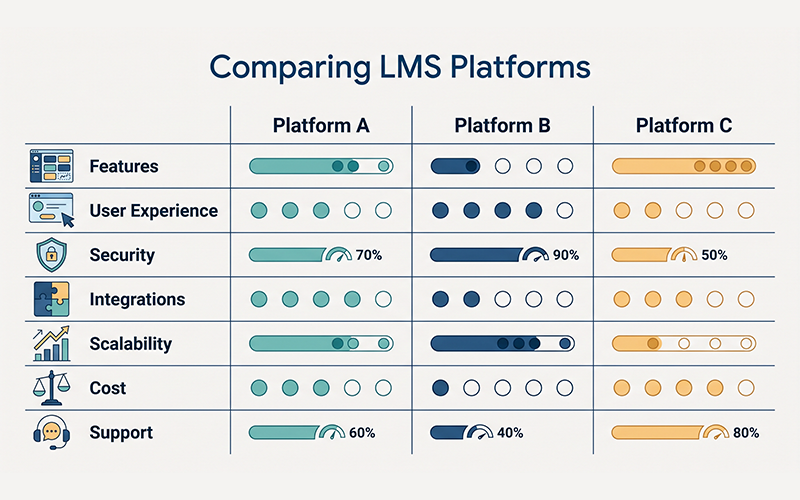
A simple learning management system evaluation framework turns subjective impressions into a comparable, defensible decision, and doubles as a straightforward LMS vendor comparison tool. Score each vendor from one to five against your requirements in categories such as features, security, integrations, user experience, scalability and support. Then apply weights reflecting your institution’s own priorities: a university with several legacy systems might weight integrations heavily, while a school with a small IT team might weight support and ease of use instead. Multiply each score by its weight and total the columns. The result will not make the decision for you, but it replaces guesswork with a record you can defend to a board or procurement committee.
Why an Integrated LMS Can Be Better Than a Standalone LMS
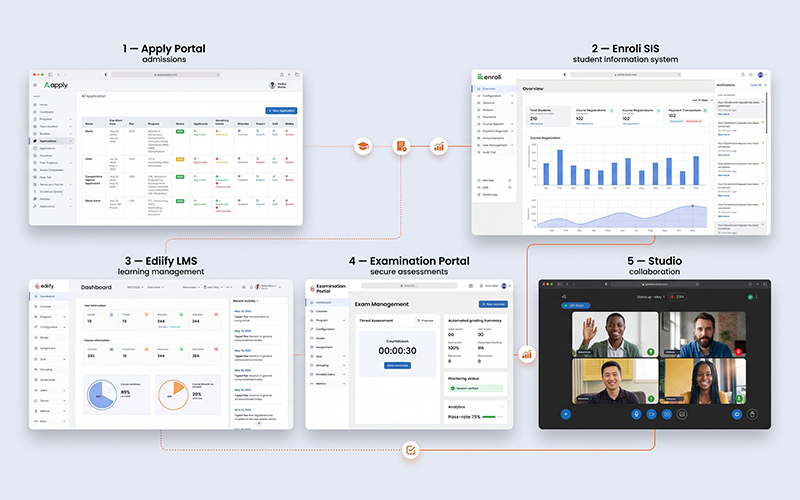
A standalone LMS, however capable, still sits apart from the rest of the student journey. An integrated approach connects the workflow instead of just the software: Application → Enrolment → Student Record → Learning → Assessment → Results.
Vigilearn’s ecosystem is built around this flow. The Apply Portal manages admissions, Enroli SIS holds the student record, Ediify LMS delivers learning, the Examination Portal manages assessment, and Studio supports communication throughout. The point is not that an institution must buy every module. It is that when systems are designed to share the same underlying data, a learner’s progress in a course can inform their academic record automatically, rather than depending on someone manually reconciling two systems that were never meant to talk to each other.
Read More: Learning Analytics in Higher Education: How Universities Turn Student Data Into Better Outcomes
Final LMS Selection Checklist
Before requesting a final proposal, use this LMS buying guide checklist to confirm the essentials are covered:
- Requirements documented
- Users identified, including projected growth
- Core features shortlisted, must-have versus optional
- Security reviewed, with specific vendor answers
- Integrations checked against existing systems
- Accessibility assessed against a recognised standard
- Mobile experience tested directly, not described
- Reporting reviewed against real institutional needs
- Vendor support evaluated, including response times
- Implementation plan reviewed and timelined
- Total cost of ownership calculated, not just licence cost
- Data ownership and export rights confirmed
- Vendor references checked with comparable institutions
How to choose an LMS ultimately comes down to sequencing: define your institution’s requirements first, then evaluate features, security, integrations, user experience, scalability and cost against those requirements, rather than the other way round. Institutions that treat LMS requirements as the starting point, not the vendor’s feature list, end up with a platform far more likely to still fit in three years, once enrolment, programmes and reporting obligations have all moved on from where they stood at demo day.
Choosing an LMS is easier when you evaluate the whole student and institutional journey, not just a list of features. Explore how Vigilearn’s Ediify LMS connects with Enroli SIS, Examination Portal, Apply Portal and Studio to create a connected learning environment, and request a Vigilearn demo to evaluate the platform against your institution’s own requirements.
Frequently Asked Questions
How do I choose an LMS? Document your institution’s requirements first: learner numbers, formats, assessment needs and existing systems. Then compare vendors against those requirements using a weighted scoring framework, rather than first impressions from a demo.
What are the most important LMS selection criteria? Core teaching features, security and data protection, integration with existing systems, user experience across students and faculty, scalability, and total cost of ownership are the criteria that consistently determine long-term fit.
What should I ask an LMS vendor? Ask specific, verifiable questions about scalability, supported integrations and standards, data protection, implementation timelines, training, support and what happens if your institution grows or the contract ends.
What should an LMS RFP include? A clear statement of institutional requirements, must-have versus optional features, security and compliance questions, integration requirements, implementation and support expectations, and a scoring framework for comparing responses.
How much does an LMS cost? Pricing depends on learner numbers, modules, deployment model and support level. For a fuller breakdown of the variables involved, see our guide to school management software cost.
What integrations should an LMS support? At minimum, integration with your student information system and identity provider, ideally through open standards such as OneRoster and LTI, alongside examination and communication tools where relevant.
How do I compare two LMS platforms? Score each platform against the same weighted criteria, covering features, security, integrations, user experience, scalability and cost, then compare the totals rather than relying on demo impressions alone.
What makes an LMS suitable for a university or school? Fit depends on institutional context: universities typically need stronger accreditation reporting and faculty autonomy, while schools often prioritise ease of use, support and integration with a smaller existing technology stack.