
Remote employee training rarely fails because the content is wrong. It fails because a new starter in Toronto, a team lead in Manchester and a support analyst in Nairobi receive the same material in three very different ways, then act on three different understandings of the same policy.
The shift is not reversing. Gallup reports that the share of on-site, remote-capable employees who say their team is spread across locations rose from 13% in 2023 to 27% in 2025, so even office-based staff now work alongside colleagues elsewhere. Meanwhile, the World Economic Forum projects that 59 out of every 100 workers will need reskilling or upskilling by 2030. A timetabled classroom cannot serve people across time zones, shift patterns and connectivity conditions. Flexibility, accessibility and consistency become the real challenges, and this guide shows how to build distributed team training that meets all three.
Read More: Why Employee Training Software Matters in Nigeria
What Is Remote Employee Training?
This is the structured delivery of workplace learning to people who are not in the same place as their trainers or colleagues. It is a mix of formats rather than a single method. Companies typically combine virtual instructor-led sessions, self-paced modules, async employee training, online assessments, digital resource libraries and an employee learning platform that holds them together. Live sessions suit discussion; recorded content suits reference and repetition; assessments confirm understanding. Virtual employee training is the delivery layer, but the learning design underneath it determines whether anything sticks.
Why Training Distributed Teams Is Challenging
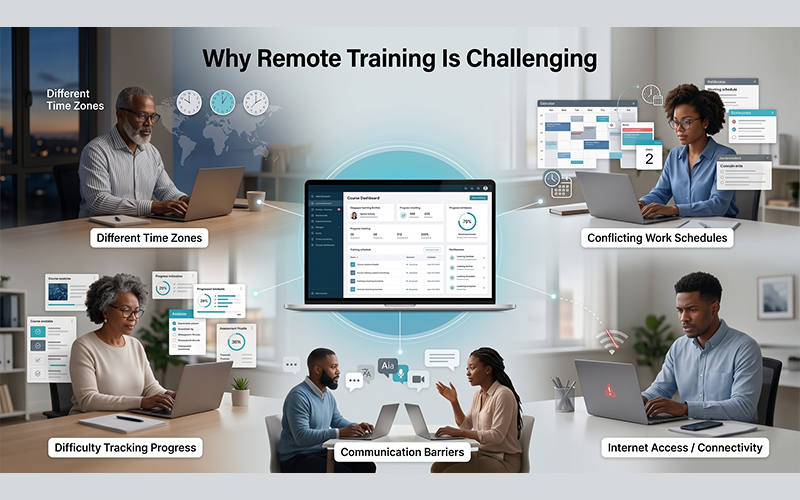
A 10 am workshop is a midnight one for someone else. Add different shift patterns, uneven devices and connectivity, language and communication barriers, and the ordinary distractions of working from home, and attention erodes quickly. Then comes inconsistency: two employees can receive different versions of the same training depending on who delivered it and which files they were sent. Completion data ends up scattered across spreadsheets, and managers cannot see who is actually ready.
Putting classroom slides on a video call fixes none of this. It simply moves the same constraints online: everyone must still be available at the same moment, and nobody gains visibility. The answer is learning infrastructure, not a better webcam.
Read More: Compliance Training Software: What Banks and Fintechs Need to Meet Modern AML Standards
Remote Onboarding and Training: Getting New Employees Up to Speed
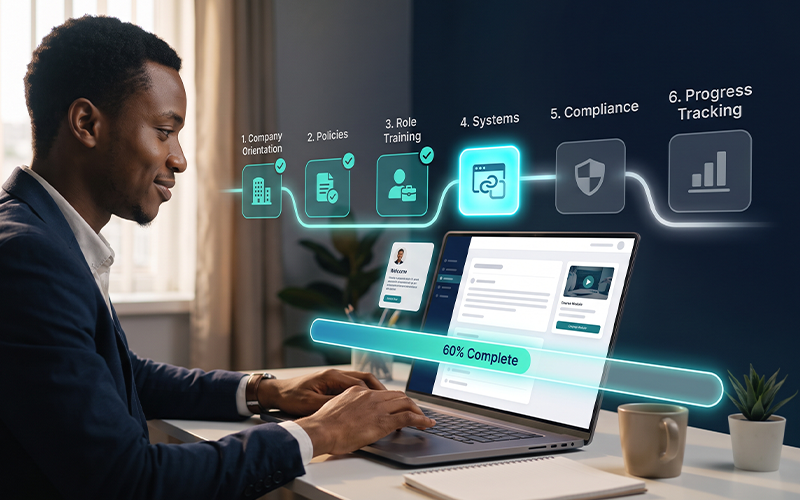
The first weeks set the tone, and they are the hardest to get right at a distance. A structured digital path can give every starter the same foundation: company orientation, policies, compliance, systems training, product knowledge and role-specific learning, released in a sensible order. Scheduled introductions to teammates keep it human. Async employee training lets new hires work around their time zone and revisit anything unclear, while progress tracking tells managers when someone is stuck, rather than three months later. Done well, remote onboarding and training give a hire in Dubai the same start as one in Dublin.
Synchronous vs Asynchronous Employee Training
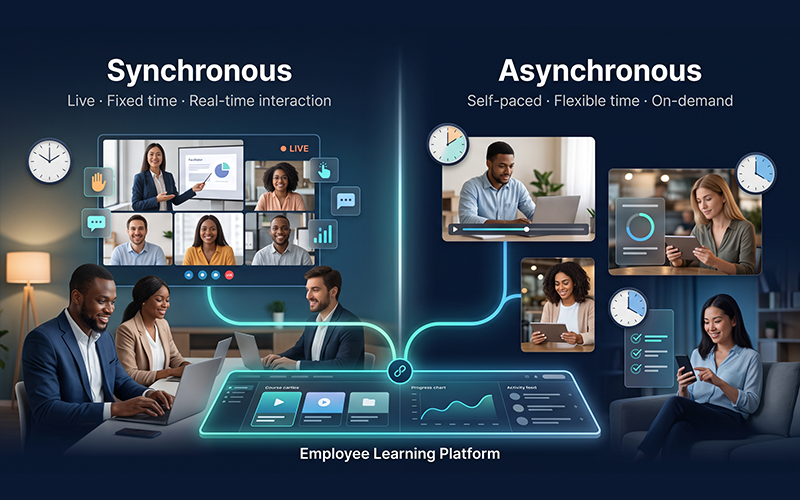
| Sychronous | Asynchronous | |
| Format | Live | Self-paced |
| Timing | Fixed | Flexible |
| Interaction | Real-time | Often delayed or independent |
| Best for | Workshops and discussions | Flexible learning and distributed teams |
| Scheduling | Harder across time zones | Easier |
| Scalability | Can need more collaboration | Easier to scale |
Asynchronous learning works by giving people an outcome, the materials and a deadline window instead of a meeting time. Learners complete lessons, submit quizzes or join discussion boards when it suits them, and instructors respond within the window. Most organisations need both. Use asynchronous content for policy, systems and knowledge transfer, and keep live time, ideally recorded, for practice, questions and debate. That balance is what makes hybrid workforce learning workable.
How to Build Consistent Training Across Distributed Teams
A practical framework:
- Define common learning objectives tied to role outcomes.
- Standardise core content so everyone learns the same policy, product and process.
- Create role-specific pathways on top of that core.
- Make content accessible across locations, devices and languages.
- Offer flexible options, both live and self-paced.
- Assess understanding, not just attendance.
- Track progress centrally.
- Update content regularly and retire what is outdated.
Consistency is not sameness for its own sake. It means an employee’s location no longer decides the quality of their learning, which builds trust in the programme. For any remote workforce training effort, that trust is what keeps participation high.
Keeping Remote Employees Engaged During Training
Engagement has to be designed in, not hoped for, and good virtual employee training feels like a conversation rather than a broadcast. Shorter modules of around ten minutes, interactive content, practical exercises, frequent low-stakes assessments, discussion prompts, timely feedback and visible progress indicators all help. So do relevant examples drawn from the learner’s own role and pathways that adapt to what they already know.
Read More: AI-Powered LMS: What It Actually Means for Universities in 2026
Managers matter most. In LinkedIn’s research, providing learning opportunities is survey respondents’ number one retention strategy, yet only 15% of employees say their manager helped them build a career plan in the past six months. Give managers a simple view of team progress and a reason to discuss it in one-to-ones.
The Role of Technology in Remote Workforce Training
Technology should solve a learning problem, not add features. The essentials are an employee learning platform with user and content management, video and interactive lessons, assessments, analytics, mobile access, notifications, integrations with HR systems, and offline or low-bandwidth access where needed. For each capability, ask what it fixes: consistency, access, engagement or visibility. Platforms that connect with the wider learning ecosystem also avoid creating another silo, as Vigilearn’s overview of LMS and eLearning solutions explains. Digital employee training only works when the tools disappear into the experience.
Making Training Accessible Across Different Connectivity Environments
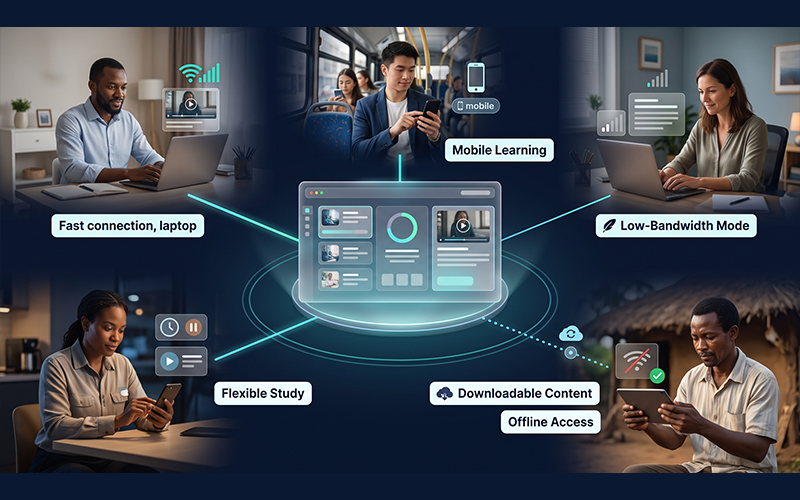
Assume nothing about bandwidth. The ITU estimates that 2.2 billion people remain offline, and that 5G reaches 84% of people in high-income countries but just 4% in low-income ones. Even in well-connected markets, trains, remote sites and shared homes create gaps.
Design for real working conditions: mobile-first layouts, downloadable resources, offline access with flexible synchronisation, low-bandwidth content and less dependence on constant live video. Vigilearn’s guide to low-bandwidth learning shows how downloads and automatic syncing keep progress intact.
How EdiifyLMS Can Support Remote Employee Training
EdiifyLMS is built for organisations that need learning to travel to where people work. It supports digital employee learning, flexible delivery, personalised pathways, engagement, progress tracking and delivery at scale, and its corporate offering centralises training management across large, distributed workforces.
Radio Mode is one capability within that. It helps extend learning access beyond environments where continuous connectivity is available, so an intermittent signal does not mean a missed lesson. It complements mobile access and offline study rather than replacing them, and it is not the only answer to remote learning.
Measuring Remote Employee Training
Attendance and course completion show that people turned up, not that they can do the job. Look instead at assessment performance, skills gained, learning engagement, participation, time to proficiency, role readiness and, where measurable, knowledge retention through spaced quizzes. Then connect those signals to business outcomes such as fewer errors or faster ramp-up.
Digital employee training produces data that classrooms never did, and distributed organisations need centralised visibility because no manager can observe learning in person. A single view by team, location and role turns anecdote into decision-making, and shows when the content, rather than the learner, needs fixing.
Read More: The ROI of Investing in Employee Training Through an LMS
How to Build a Long-Term Remote Learning Culture
A programme becomes a culture when learning sits inside the working week. Encourage managers to take part, build peer learning through communities and forums, recognise progress, and show clear career pathways. Weave short lessons into real work: a ten-minute module before a client call, a shared lesson after a project review. For hybrid workforce learning, that means one programme serves office days and home days alike. The WEF notes that 63% of employers cite skills gaps as a main barrier to transformation, which makes remote learning a workforce development priority rather than a one-off initiative.
The Future of Distributed Learning
Expect AI-powered personalisation and adaptive learning to tailor pathways to what each person already knows, with personalised recommendations replacing static course catalogues. Skills-based learning will matter more than job titles. Mobile and offline learning will keep widening access, more flexible formats will suit different working patterns, and richer analytics will tie learning ever more closely to workforce development.
Frequently Asked Questions
What is remote employee training?
It is the delivery of workplace learning to employees in different locations, using digital content, live virtual sessions, self-paced modules and online assessments.
How do you train employees remotely?
Combine a common core curriculum, self-paced modules for flexibility, live sessions for discussion, assessments to check understanding, and a platform that tracks progress.
What is the best way to train a distributed team?
Standardise core content, add role-specific pathways, blend live and asynchronous formats, and measure outcomes centrally.
What is asynchronous employee training?
Learning completed on the learner’s own schedule within an agreed window, using recorded lessons, quizzes and discussion boards instead of a fixed meeting time.
How do you onboard remote employees?
Use a structured digital path covering orientation, policies, systems, compliance and role training; add scheduled team introductions; and monitor progress so managers can step in early.
How can companies keep remote employees engaged in training?
Use short interactive modules, practical exercises, feedback and visible progress, with relevant examples and active manager involvement.
How do companies track the progress of remote learners?
Through a learning platform that records assessments, participation, and time to proficiency by team, location and role.
What technology do you need to train remote teams?
An employee learning platform with user and content management, assessments, analytics, mobile access, notifications, integrations and offline options where required.
Consistent distributed team training is a design decision, not a by-product of going online. Start small: audit your core content, move one onboarding path into a self-paced format, and agree the outcomes you will measure. Then build outwards, with flexibility, engagement and visibility in mind.
Remote teams need more than access to online courses. They need a learning experience that is consistent, flexible, engaging and accessible wherever employees work. Explore how Ediify can help organisations build scalable digital learning experiences for distributed teams, or talk to the Vigilearn team.
